Magnetic Desktop Stand

O R B I T

Precision in Every Angle.

Setup, compatibility and support for your NSE ORBIT magnetic desktop stand.

Setup video

Get set up in under a minute.

Setup video coming soon
Your written setup guide is available below.
Quick setup

HOLD • ROTATE • ELEVATE

1

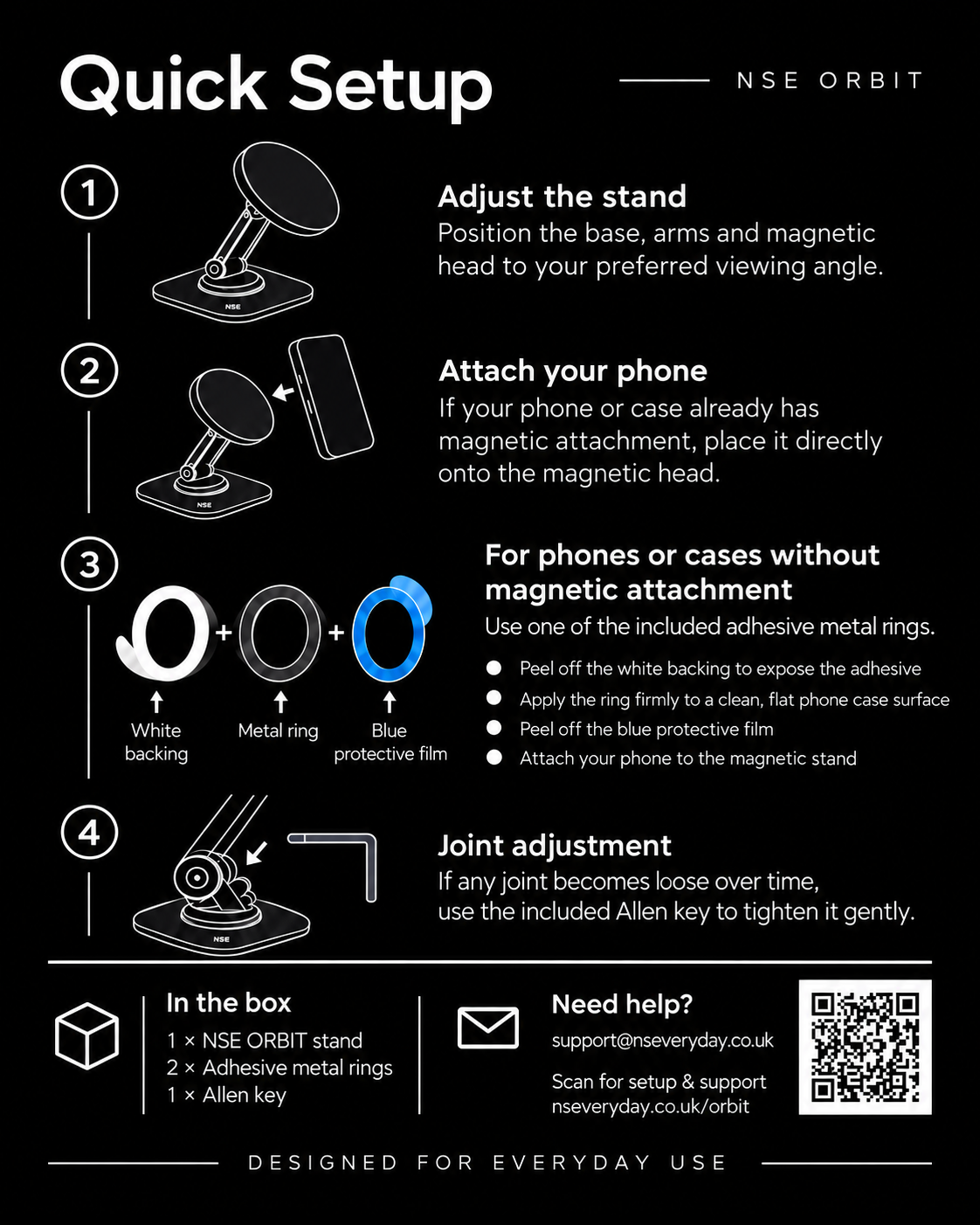
Adjust the stand

Position the base, arms and magnetic head to your preferred viewing angle.
2

Attach your phone

If your phone or case already has magnetic attachment, place it directly onto the magnetic head.

3

No magnetic attachment?

Use one of the two included adhesive metal rings. Follow the ring instructions below.

4

Adjust joint tension

If a joint becomes loose over time, use the included Allen key to tighten it gently.
Adhesive metal rings

For phones or cases without magnetic attachment.

1

Clean the surface

Make sure the back of the phone case is clean, dry and flat before applying the ring.

2

Peel the white backing

Remove the white protective ring to expose the adhesive side.

3

Apply the metal ring

Press the ring firmly onto the back of the phone case.

4

Peel the blue film

Remove the blue protective ring from the outer metal face, then attach the phone to NSE ORBIT.

Magnetic compatibility varies by phone and case. The included adhesive metal rings are intended for phones or cases that do not already provide magnetic attachment.
In the box

Everything you need.

1 × NSE ORBIT stand

Magnetic desktop stand with articulated adjustment.

2 × adhesive metal rings

For phones or cases without magnetic attachment.

1 × Allen key

For gentle joint-tightening if required over time.

1 × instruction card

Quick setup and support details.

Help

Common questions

Do I need to use one of the adhesive metal rings?

No. If your phone or case already attaches magnetically to the stand, you can use NSE ORBIT directly. Use a ring only if magnetic attachment is not already available.

What are the blue and white rings?

They are protective films matching the shape of the metal ring. The white film covers the adhesive side. The blue film protects the outer metal face and is removed after the ring is fitted.

What if one of the joints feels loose?

Use the supplied Allen key to tighten the relevant joint gently. Do not overtighten.

Still need help?

Email support@nseveryday.co.uk and we’ll help with setup or product questions.